# How to Use IndexedDB to Manage State in JavaScript
#### Who needs Redux when you can code your own state manager with vanilla JS?
Use IndexedDB to Manage State in JavaScript
My previous article, [Getting Started with IndexedDB for Big Data Storage](https://medium.com/stackanatomy/getting-started-with-indexeddb-for-big-data-storage-c8d47c718471), demonstrated how to use the browser’s IndexedDB NoSQL database to store data. IndexedDB has [good cross-browser support](https://caniuse.com/indexeddb) and offers at least 1GB of storage.
This article explains how to use IndexedDB to store state in a typical client-side JavaScript application.
[**The code is available from Github**](https://github.com/craigbuckler/asayer-idbstate). It provides an example to-do app which you can use or adapt for your own projects.
### What do we mean by “state”?
All applications store state. For a to-do app, it’s a list of items. For a game, it’s the current score, weapons available, power-up time remaining, etc. Variables store state but these can become unwieldly as complexity increases.
State management systems such as [Redux](https://redux.js.org/) and [Vuex](https://vuex.vuejs.org/) provide centralized data stores. Any JavaScript component can read, update, or delete data. Some systems permit components to *subscribe* to change events. For example, when a user toggles light/dark mode, all components update their styles accordingly.
Most state management systems store values in memory although techniques and plugins are available to transfer data to localStorage, cookies, etc.
### Is IndexedDB suitable for storing state?
As always: *it depends*.
IndexedDB offers some benefits:
1. It can typically store 1GB of data which makes it suitable for large objects, files, images etc. Moving these items out of memory can make an application faster and more efficient.
2. Unlike cookies and Web Storage ( `localStorage` and `sessionStorage`), IndexedDB stores native JavaScript object data. There's no need to serialize into JSON strings or deserialize back again.
3. IndexedDB access is asynchronous so it has minimal impact on the main JavaScript processing thread.
> *Note that Web Storage is synchronous:* your JavaScript code pauses execution while it accesses data*. This can cause performance issues when saving larger datasets.*
Asynchronous data access has some drawbacks:
* The IndexedDB API uses older callback and event methods so a Promise-based wrapper library is practical.
* `async` class constructors and [Proxy](https://developer.mozilla.org/docs/Web/JavaScript/Reference/Global_Objects/Proxy) get/set handlers are not possible in JavaScript. This poses some challenges for state management systems.
### Creating an IndexedDB-based state management system
The [**example code below**](https://github.com/craigbuckler/asayer-idbstate) implements a simple `State` management system in 35 lines of JavaScript. It offers the following features:
* You can define a *state* with a `name` (string) and a `value` (primitive, array, object, etc). An IndexedDB object store saves these values using the name as an index.
* Any JavaScript component can `set` or `get` a value by its name.
* When a value is `set`, the state manager alerts all subscribed components about the change. A component subscribes itself via the `State` constructor, or by setting or getting a named value.
A to-do list project demonstrates the `State` manager. It defines two [Web Components](https://developer.mozilla.org/docs/Web/Web_Components) which both access the same `todolist` array of tasks managed by `State` objects:
1. `todo-list.js`: renders the `todolist` HTML and removes an item when the user clicks it's 'done' button.
2. `todo-add.js`: shows an "add new item" form which appends new tasks to the `todolist` array.
> *Note: A single todo list component would be more practical, but this demonstrates how two isolated classes can share the same state.*
### Creating an IndexedDB wrapper class
The [Getting Started article](https://blog.openreplay.com/getting-started-with-indexeddb-for-big-data-storage) provided a Promise-based IndexedDB wrapper. We require a similar class, but it can be simpler because it fetches single records by `name`.
The `js/lib/indexeddb.js` script defines an `IndexedDB` class with a constructor. It accepts a database name, version, and upgrade function. It returns the instantiated object following a successful connection to the IndexedDB database:
// IndexedDB wrapper class
export class IndexedDB {
// connect to IndexedDB database
constructor(dbName, dbVersion, dbUpgrade) {
return new Promise((resolve, reject) => {
// connection object
this.db = null;
// no support
if (!('indexedDB' in window)) reject('not supported');
// open database
const dbOpen = indexedDB.open(dbName, dbVersion);
if (dbUpgrade) {
// database upgrade event
dbOpen.onupgradeneeded = e => {
dbUpgrade(dbOpen.result, e.oldVersion, e.newVersion);
};
}
dbOpen.onsuccess = () => {
this.db = dbOpen.result;
resolve( this );
};
dbOpen.onerror = e => {
reject(\`IndexedDB error: ${ e.target.errorCode }\`);
};
});
}
The asynchronous `set` method stores a `value` with the `name` identifier in the `storeName` object store. IndexedDB handles all operations in a transaction which triggers events that resolve or reject the Promise:
// store item
set(storeName, name, value) {
return new Promise((resolve, reject) => {
// new transaction
const
transaction = this.db.transaction(storeName, 'readwrite'),
store = transaction.objectStore(storeName);
// write record
store.put(value, name);
transaction.oncomplete = () => {
resolve(true); // success
};
transaction.onerror = () => {
reject(transaction.error); // failure
};
});
}
Similarly, the asynchronous `get` method retrieves the `value` with the `name` identifier in the `storeName` object store:
// get named item
get(storeName, name) {
return new Promise((resolve, reject) => {
// new transaction
const
transaction = this.db.transaction(storeName, 'readonly'),
store = transaction.objectStore(storeName),
// read record
request = store.get(name);
request.onsuccess = () => {
resolve(request.result); // success
};
request.onerror = () => {
reject(request.error); // failure
};
});
}
}
### Open Source Session Replay
Whether you’re using React, Vue or just vanillaJS, debugging a web application in production may be challenging and time-consuming. [OpenReplay](https://github.com/openreplay/openreplay) is an Open-source alternative to FullStory, LogRocket and Hotjar. It allows you to monitor and replay everything your users do and shows how your app behaves for every issue. It’s like having your browser’s inspector open while looking over your user’s shoulder. OpenReplay is the only open-source alternative currently available.

Happy debugging, for modern frontend teams — [Start monitoring your web app for free](https://github.com/openreplay/openreplay).
### Creating the State manager class
A `js/lib/state.js` script imports `IndexedDB` and defines a `State` class. It shares five `static` property values across all instantiations:
1. `dbName`: the name of the IndexedDB database used for state storage (`"stateDB"`)
2. `dbVersion`: the database version number (`1`)
3. `storeName`: the name of the object store used to store all name/value pairs (`"state"`)
4. `DB`: a reference to a single `IndexedDB` object used to access the database, and
5. `target`: an [EventTarget() object](https://developer.mozilla.org/en-US/docs/Web/API/EventTarget) which can dispatch and receive events across all `State` objects.
// simple state handler
import { IndexedDB } from './indexeddb.js';
export class State {
static dbName = 'stateDB';
static dbVersion = 1;
static storeName = 'state';
static DB = null;
static target = new EventTarget();
The constructor accepts two optional parameters:
1. an array of `observed` names, and
2. an `updateCallback` function. This function receives the `name` and `value` whenever a state updates.
A handler listens for `set` events called when state changes. It runs the `updateCallback` function when the passed `name` is being `observed`.
// object constructor
constructor(observed, updateCallback) {
// state change callback
this.updateCallback = updateCallback;
// observed properties
this.observed = new Set(observed);
// subscribe to set events
State.target.addEventListener('set', e => {
if (this.updateCallback && this.observed.has( e.detail.name )) {
this.updateCallback(e.detail.name, e.detail.value);
}
});
}
The class does not connect to the IndexedDB database until it’s required. The `dbConnect` method establishes a connection and reuses it across all `State` objects. On the first run, it creates a new object store named `state` (as defined in the static `storeName` property):
// connect to IndexedDB database
async dbConnect() {
State.DB = State.DB || await new IndexedDB(
State.dbName,
State.dbVersion,
(db, oldVersion, newVersion) => {
// upgrade database
switch (oldVersion) {
case 0: {
db.createObjectStore( State.storeName );
}
}
});
return State.DB;
}
The asynchronous `set` method updates a named value. It adds the `name` to the `observed` list, connects to the IndexedDB database, sets the new value, and triggers a `set` [CustomEvent](https://developer.mozilla.org/docs/Web/API/CustomEvent) which all `State` objects receive:
// set value in DB
async set(name, value) {
// add observed property
this.observed.add(name);
// database update
const db = await this.dbConnect();
await db.set( State.storeName, name, value );
// raise event
const event = new CustomEvent('set', { detail: { name, value } });
State.target.dispatchEvent(event);
}
The asynchronous `get` method returns a named value. It adds the `name` to the `observed` list, connects to the IndexedDB database, and retrieves the indexed data:
// get value from DB
async get(name) {
// add observed property
this.observed.add(name);
// database fetch
const db = await this.dbConnect();
return await db.get( State.storeName, name );
}
}
You can retrieve and update state values using a new `State` object, e.g.
import { State } from './state.js';
(async () => {
// instantiate
const state = new State(\[\], stateUpdated);
// get latest value and default to zero
let myval = await state.get('myval') || 0;
// set a new state value
await state.set('myval', myval + 1);
// callback runs when myval updates
function stateUpdated(name, value) {
console.log(\`${ name } is now ${ value }\`)
}
})()
Other code can receive state update notifications about the same item, e.g.
new State(\['myval'\], (name, value) => {
console.log(\`I also see ${ name } is now set to ${ value }!\`)
});
### Creating a state-managed todo list
A simple to-do list app demonstrates the state management system:
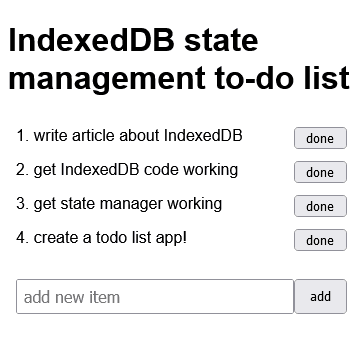
The `index.html` file defines two custom elements:
IndexedDB state management to-do list
IndexedDB state management to-do list
* `` - the todo list controlled by `./js/components/todo-list.js` which updates the list when tasks are added and removed, and
* `` - a form to add items to the todo list controlled by `./js/components/todo-list.js`.
`./js/main.js` loads both component modules:
The scripts define frameworkless [Web Components](https://developer.mozilla.org/docs/Web/Web_Components) which get and set a shared `todolist` state. Web Components are beyond the scope of this article, but the basics are:
1. You can define a custom HTML element (such as ``). The name must contain a dash (`-`) to avoid clashes with current or future HTML elements.
2. A JavaScript class which `extends` [HTMLElement](https://developer.mozilla.org/en-US/docs/Web/API/HTMLElement) defines the functionality. The constructor must call `super()`.
3. The browser calls a `connectedCallback()` method when it's ready to update the DOM. The method can append content, optionally using an encapsulated [Shadow DOM](https://developer.mozilla.org/docs/Web/Web_Components/Using_shadow_DOM) which is not accessible to other scripts.
4. [customElements.define](https://developer.mozilla.org/docs/Web/API/CustomElementRegistry/define) registers the class with the custom element.
### The `` component
`./js/components/todo-list.js` defines the `TodoList` class for the `` component. It shows a list of tasks and handles deletion when the user clicks a 'done' button. The class sets static HTML strings and creates a new `State` object. This monitors the a `todolist` variable and runs the object's `render()` method when its value changes:
import { State } from '../lib/state.js';
class TodoList extends HTMLElement {
static style = \`
\`;
static template = \`
$1
\`;
constructor() {
super();
this.state = new State(\['todolist'\], this.render.bind(this));
}
The `render()` method receives the updated `name` and `value` (only `todolist` will arrive). It stores the list as a local object property then appends HTML to the Shadow DOM (created by the `connectedCallback()` method):
// show todo list
render(name, value) {
// update state
this\[name\] = value;
// create new list
let list = '';
this.todolist.map((v, i) => {
list += TodoList.template.replace('$1', v).replace('$2', i);
});
this.shadow.innerHTML = \`${ TodoList.style }${ list }\`;
}
The `connectedCallback()` method runs when the DOM is ready. It:
1. creates a new Shadow DOM and passes the latest `todolist` state to the `render()` method, and
2. attaches a click event handler which removes an item from the `todolist` state. The `render()` method will automatically execute because the state changed.
// initialise
async connectedCallback() {
this.shadow = this.attachShadow({ mode: 'closed' });
this.render('todolist', await this.state.get('todolist') || \[\]);
// remove item event
this.shadow.addEventListener('click', async e => {
if (e.target.nodeName !== 'BUTTON') return;
this.todolist.splice(e.target.value, 1);
await this.state.set('todolist', this.todolist);
});
}
The `TodoList` class is then registered for the `` component:
}
// register component
customElements.define( 'todo-list', TodoList );
### The `` component
`./js/components/todo-add.js` defines the `TodoAdd` class for the `` component. It shows a form that can append new tasks to the `todolist` state. It sets a static HTML string and creates a new `State` object. This monitors the `todolist` state and retains it as a local object property:
class TodoAdd extends HTMLElement {
static template = \`
\`;
constructor() {
super();
this.state = new State(\['todolist'\], (name, value) => this\[name\] = value );
}
The `connectedCallback()` method runs when the DOM is ready. It:
1. fetches the latest `todolist` state into a local property which defaults to an empty array
2. appends the form HTML to a Shadow DOM, and
3. attaches a submit event handler which adds an new item to the `todolist` state (which, in turn, updates the `` component). It then clears the input field so you can add another task.
// initialise
async connectedCallback() {
// get latest todo list
this.todolist = await this.state.get('todolist') || \[\];
const shadow = this.attachShadow({ mode: 'closed' });
shadow.innerHTML = TodoAdd.template;
const add = shadow.querySelector('input');
shadow.querySelector('form').addEventListener('submit', async e => {
e.preventDefault();
// add item to list
await this.state.set('todolist', this.todolist.concat(add.value));
add.value = '';
add.focus();
});
}
The `TodoAdd` class is then registered for the `` component:
}
// register component
customElements.define( 'todo-add', TodoAdd );
### Conclusion
Projects often avoid IndexedDB because its API is clunky. It’s not an obvious choice for state management, but the indexed database and large storage allocation could make it a good option for complex projects which store significant volumes of data.
*Originally published at* [*https://blog.openreplay.com*](https://blog.openreplay.com/how-to-use-indexdb-to-manage-state-in-javascript) *on July 8, 2021.*